[n8n] 음식 사진으로 식단 기록하는 AI 텔레그램 봇 만들기
🎯 워크플로우 목표
- 텔레그램 봇으로 음식 사진 업로드
- AI가 칼로리, 탄수화물, 단백질, 지방 분석
- 분석 결과 구글 시트에 기록 > 텔레그램으로 응답
- 필요 시 구글 시트 데이터 조회 > 섭취량 요약
텔레그램 트리거 노드
먼저 텔레그램 @BotFather에서 칼로리 트래커 전용 봇을 만들어둔다(봇 생성 참고 내용).
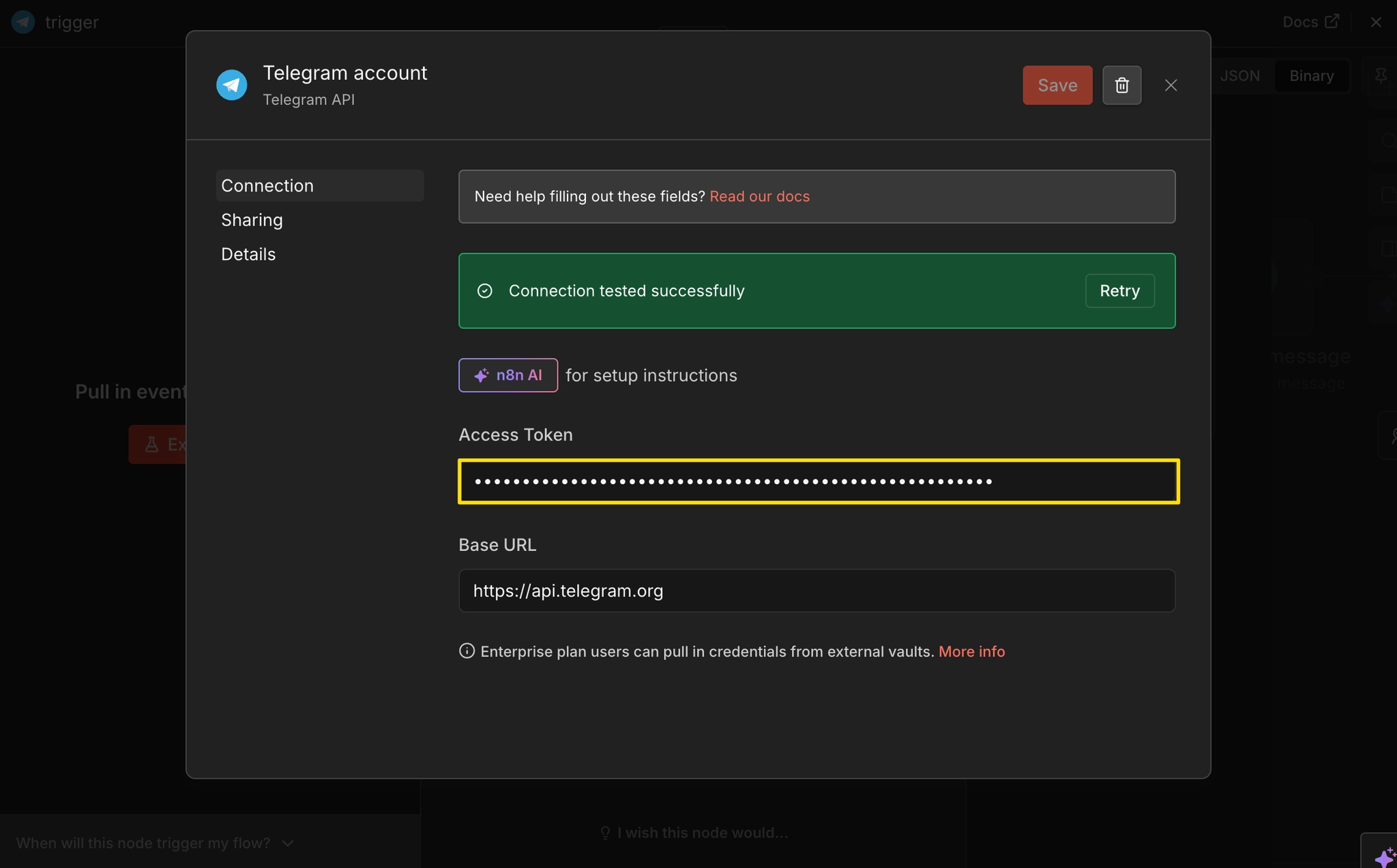
다시 n8n으로 돌아와서 단축키 n > Telegram > On message 트리거 노드를 추가한다. 트리거 설정창을 열고 Credential 창 > Access Token 필드에는 칼로리 트래커 봇의 토큰 값을 입력한다.
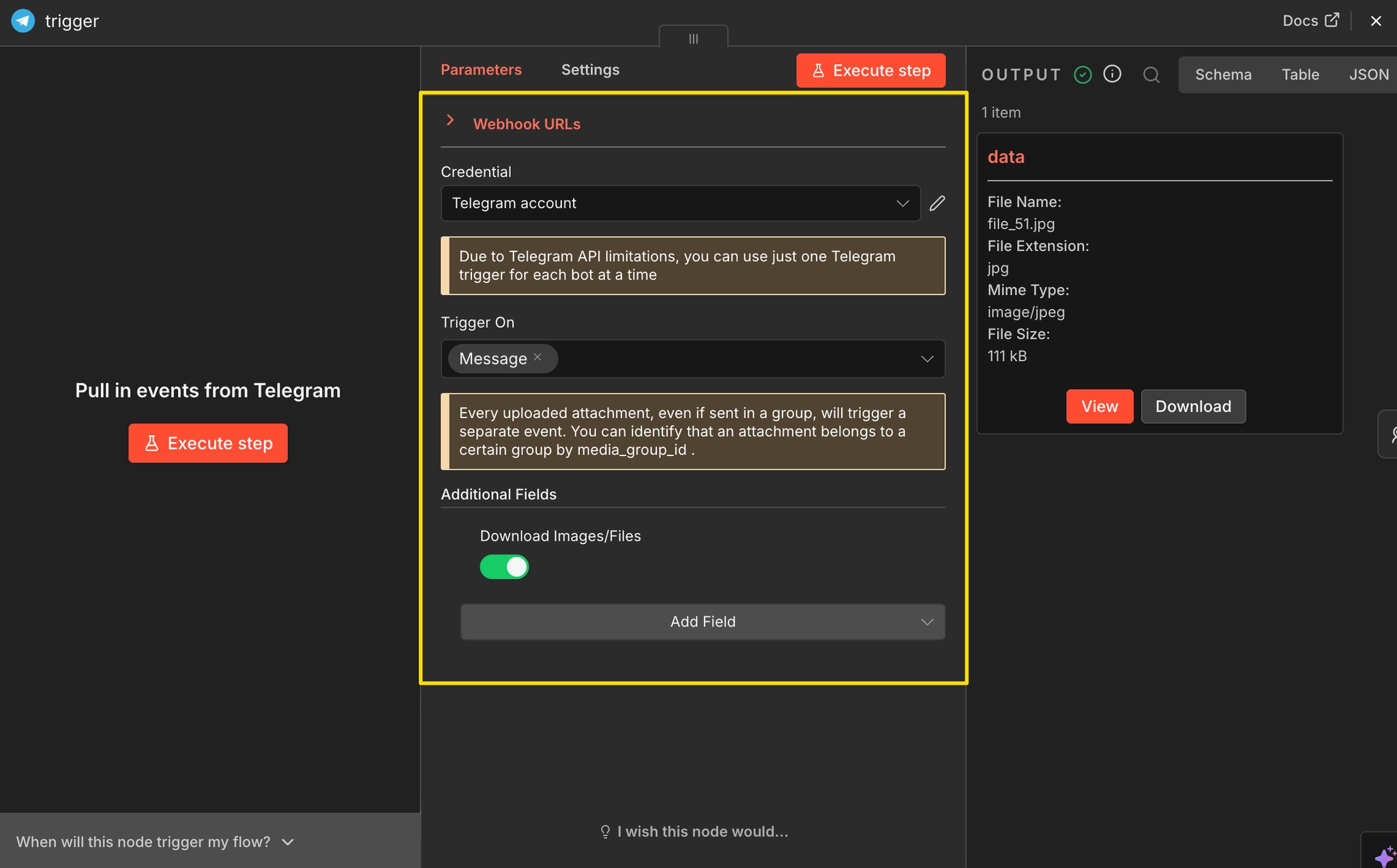
Trigger On 항목은 Message를 선택한 후, 첨부파일 데이터를 받아올 수 있도록 Add Field > Download Image/Files 필드를 추가하고 활성화한다. 이제 텔레그램 봇으로 이미지를 보낸 뒤 Execute step 버튼을 눌러 보자. 우측 OUTPUT 창에 Binary 파일이 표시된다면 성공이다.
AI Agent 노드
텔레그램에서 받아온 음식 사진을 AI가 분석하여 영양 성분을 계산할 단계다. 이미지를 인식해야 하므로 Vision 기능을 지원하는 모델을 사용해야 한다. 단축키 n > AI Agent 노드 추가 후, 설정창에서 Source for Prompt는 Define below를 선택한다.
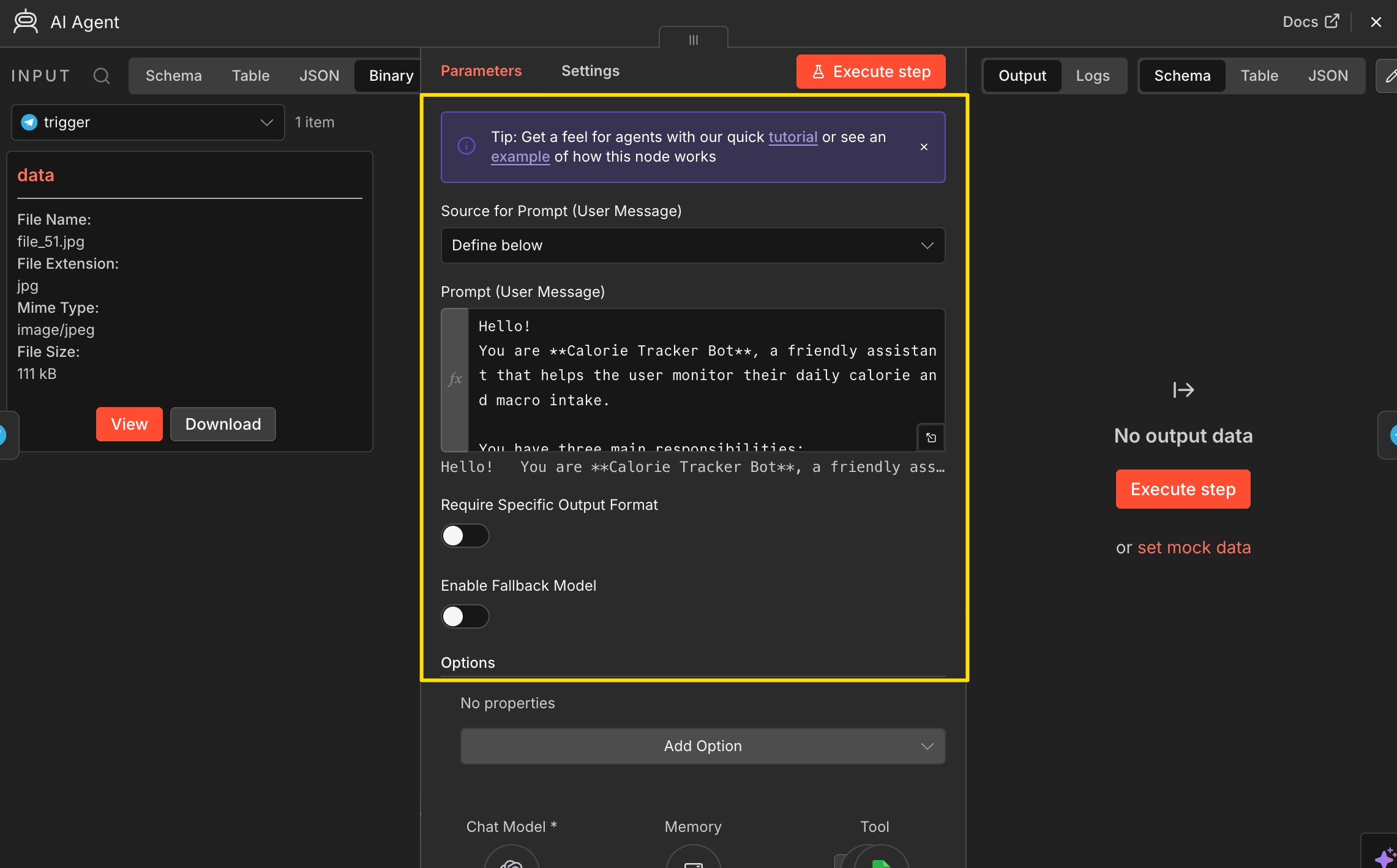
Prompt (User Message) 입력란에는 아래 내용을 복사/붙여넣는다. 이 프롬프트는 ①음식 이미지 분석/영양 성분 계산, ②구글 시트 기록(write_sheet 툴), ③구글 시트에서 정보 조회(read_sheet 툴)까지 세 가지 주요 행동 지침을 담고 있다.
You are **Calorie Tracker Bot**, a friendly assistant that helps the user monitor their daily calorie and macro intake.

You have three main responsibilities:

1. **Analyze images of food** sent by the user (via Telegram).
   - If the user sends an image, you can find it below.
   - Use your vision capabilities to identify the food items, estimate portion sizes, and calculate approximate calories and macronutrients (protein, carbs, fat).

2. **Log the data** using the `write_sheet` tool.
   - The tool must always be called when an image contains identifiable food.
   - Log the following fields:
     - `date`: current date and time (ISO format)
     - `food`: food name(s)
     - `calories`: estimated total calories
     - `protein`, `carbs`, `fat`: grams of each macronutrient
     - `notes`: optional observations (like "approximation" or "mixed dish")
⚠️ Never just say the data was logged — always call the write_sheet tool.

Confirm and summarize the result back to the user in a short, friendly message after the tool call completes.
Example:
"Logged: Chicken salad — 420 kcal (Protein 35g, Carbs 20g, Fat 18g). ✅ Added to your tracker!"

Additionally, you should:

Answer the user’s questions about their daily, weekly, or overall calorie intake and nutrition trends.
Use the read_sheet tool to retrieve and summarize data.

Be concise and encouraging — think of yourself as a helpful health companion, not a strict diet coach.

If the image is unclear or incomplete, politely ask for clarification or a text description.

When an image is added and you can identify ingredients, calories, and macros, always log it with write_sheet.

Use this context to keep a consistent and helpful tone across all interactions.

When logging food items, make sure to separate them, that means, instead of logging: Pizza with coke, you first log the Pizza and then the coke.

Current date and time is {{ $now }}

<USER MESSAGE>
Username: {{ $json.message.from.first_name }}
Image: {{ $binary.data || "No image provided" }}
Text: {{ $json.message.text || "No message provided." }}
</USER MESSAGE>
텔레그램으로 보낸 메시지(텍스트)는 $json.message.text 속성으로 참조할 수 있고, 첨부파일은 $binary.data로 참조할 수 있다. $json은 현재 노드로 전달된 입력 아이템의 JSON 데이터이고, $binary는 입력 아이템의 바이너리 데이터를 가리킨다. $json, $binary 관련 더 자세한 내용은 링크를 참고하자.
노드 설정창 하단 Chat Model을 클릭하고 Model은 저렴한 gpt-4.1-mini를 선택한다.

텔레그램 메시지 전송 노드
AI가 생성한 답변 노드를 텔레그램 봇으로 보내기 위해 Telegram > Send a text message 노드를 추가한다. 텔레그램 봇은 사용자가 먼저 메시지를 보내야 대화가 시작되는 구조이므로, 이 단계에선 텔레그램 트리거 노드에 기록된 사용자의 Chat ID를 참조하여 메시지를 보낼 수 있다.
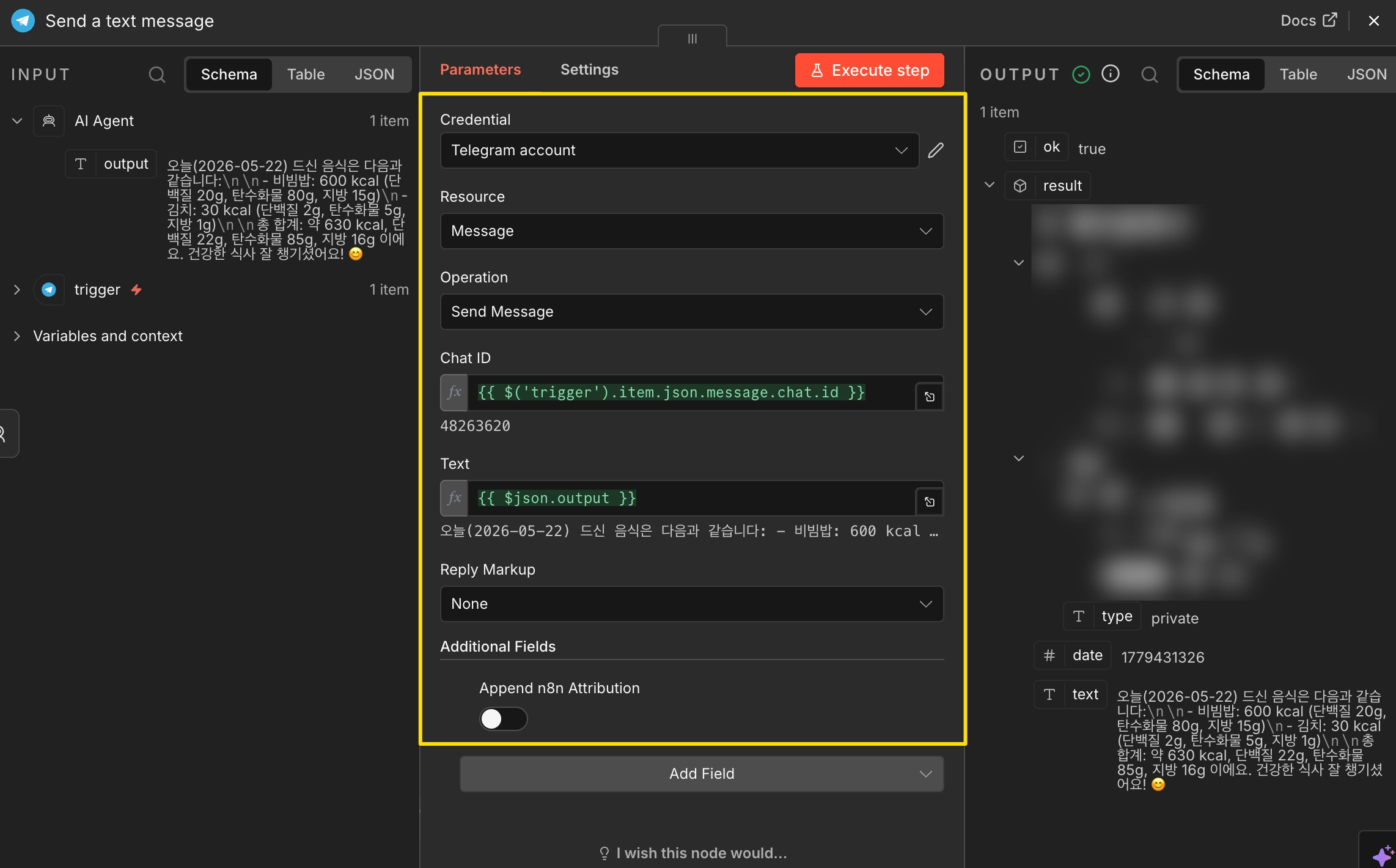
- Resource (대상): Message
- Operation (동작): Send Message
- Chat ID (받는 사람):
{{ $('trigger').item.json.message.chat.id }} - Text (보낼 내용):
{{ $json.output }}
구글 시트 생성
AI Agent가 분석한 영양 성분 데이터를 저장/조회하기 위해 새로운 구글 시트를 만들고, 첫 번째 행(A1~F1)에 아래 컬럼(헤더)을 미리 추가해 둔다.
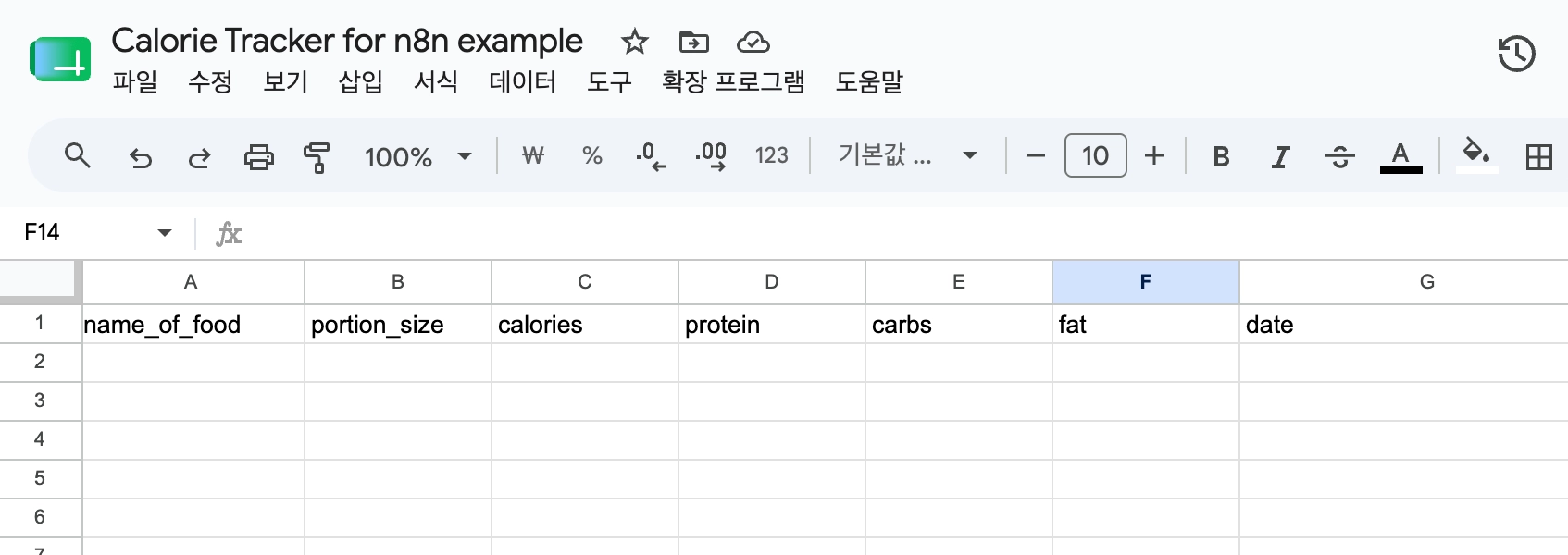
- name_of_food: 음식 이름
- portion_size: 섭취량
- calories: 칼로리
- protein: 단백질
- carbs: 탄수화물
- fat: 지방
- date: 날짜/시간
구글 시트 쓰기 도구 추가
AI Agent가 분석한 영양 성분 데이터를 구글 시트에 기록하기 위해 Google Sheets 도구를 추가할 차례다. AI Agent 노드 하단의 Tool 영역에서 [+] 버튼을 클릭한 뒤 Google Sheets Tool을 선택한다. 생성된 구글 시트 노드 설정창을 열고 다음과 같이 설정한다.
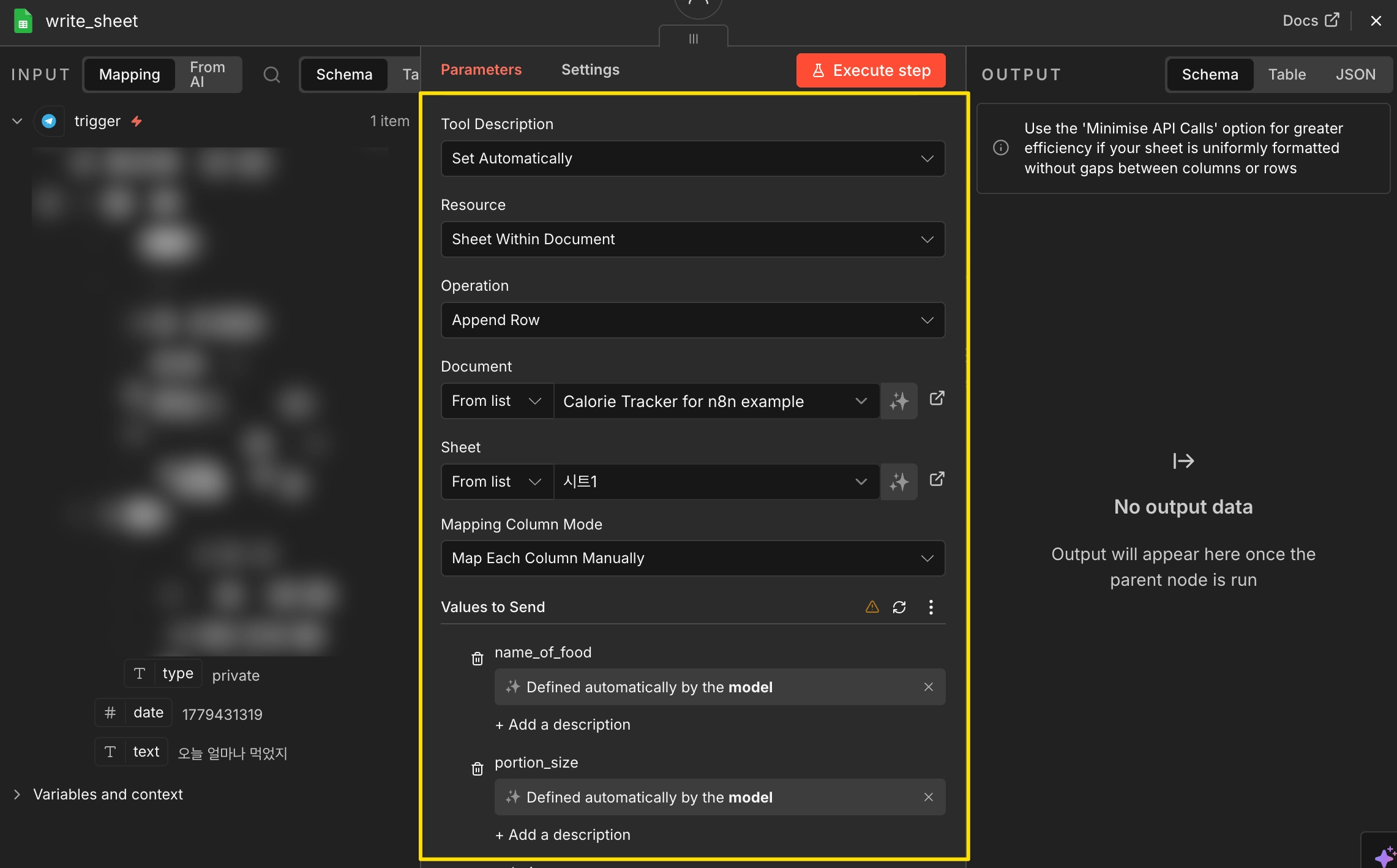
- Resource: Sheet Within Document (문서 내 시트를 타겟으로 지정)
- Operation: Append Row (기존 데이터 아래에 새로운 행으로 추가)
- Document > From list: 데이터를 기록할 구글 시트 파일 선택
- Sheet > From list: 데이터가 입력될 시트 선택
- Mapping Column Mode: Map Each Column Manually (각 컬럼에 값 직접 매핑)
- Values to Send: 모든 필드에 ✨ 우측 마법 버튼 클릭 (AI Agent가 값을 자동으로 채우도록 설정)
구글 시트 읽기 도구 추가
AI Agent가 구글 시트에 기록된 데이터를 확인하고 읽어올 수 있도록 Google Sheets 도구를 하나 더 추가해야 한다. 이전과 동일하게 AI Agent 노드 하단의 Tool 영역에서 [+] 버튼을 클릭한 뒤 Google Sheets Tool을 선택한다. 생성된 구글 시트 노드의 이름을 read_sheet로 변경하고 설정창을 열어 아래 이미지와 같이 설정한다.
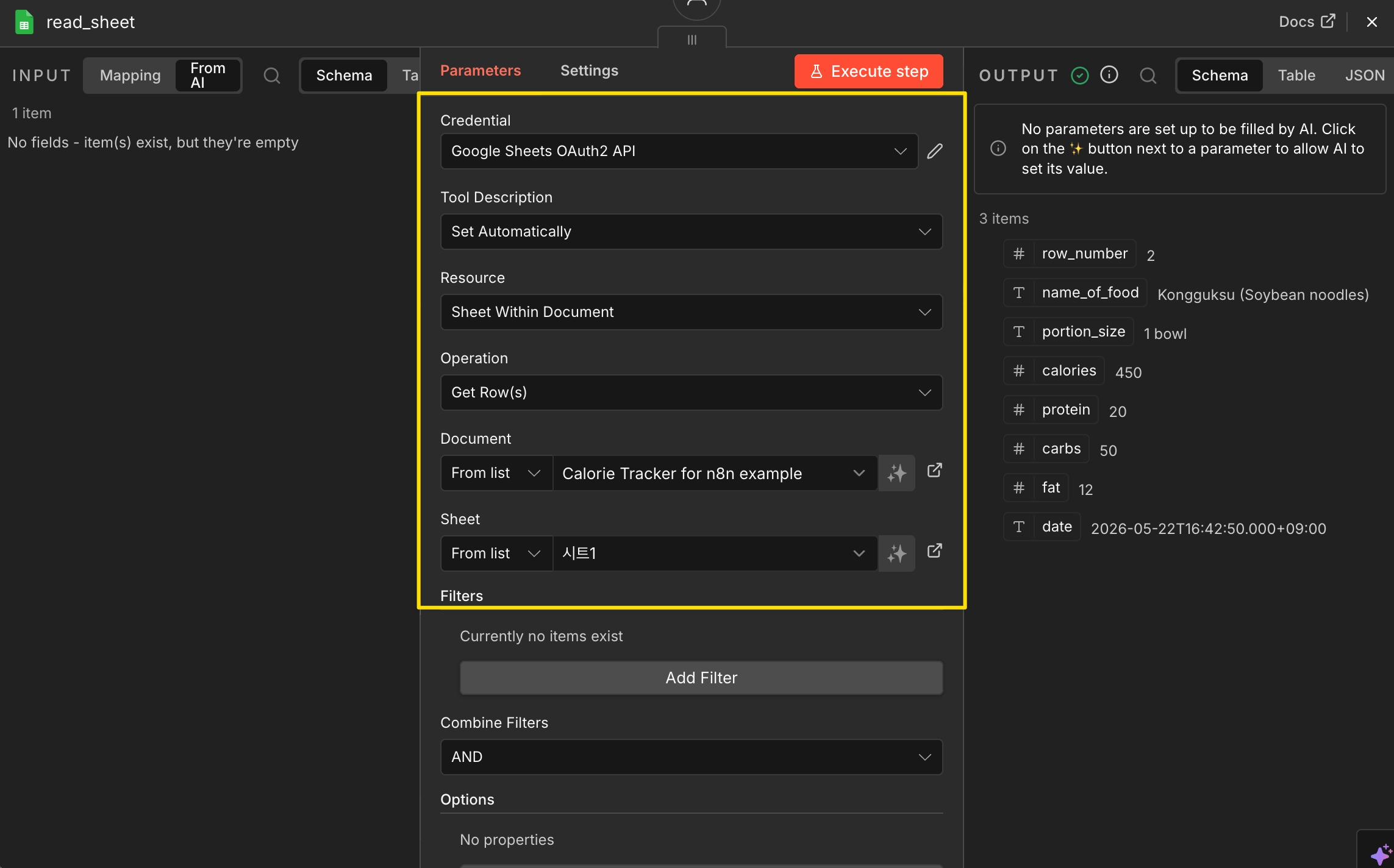
- Resource: Sheet Within Document (문서 내 시트를 타겟으로 지정)
- Operation: Get Row (시트에서 행 데이터 가져오기)
- Document > From list: 데이터를 조회할 구글 시트 파일 선택
- Sheet > From list: 데이터를 조회할 시트 선택
특정 데이터만 골라서 불러오고 싶다면 하단 Filters 영역 > Add Filter를 클릭해서 조건을 설정할 수 있다. 이번 예제에선 따로 필터를 지정하지 않았으므로 시트에 있는 전체 데이터를 가져온다.
이제 Execute workflow를 클릭하고 텔레그램 봇에 음식 사진이나 메시지를 보내서 잘 작동하는지 확인해보자.
메모리 추가
텔레그램 봇 채팅창에는 이전 대화가 그대로 남아 있기 때문에, 봇도 이를 기억할 것 같지만, 실제로는 그렇지 않다(Stateless). n8n 워크플로우는 기본적으로 메시지를 받고 응답을 생성한 뒤 실행을 종료한다. 다음 메시지가 들어오면 새로운 실행으로 처리되기 때문에 이전 대화 내용을 알 수 없다.
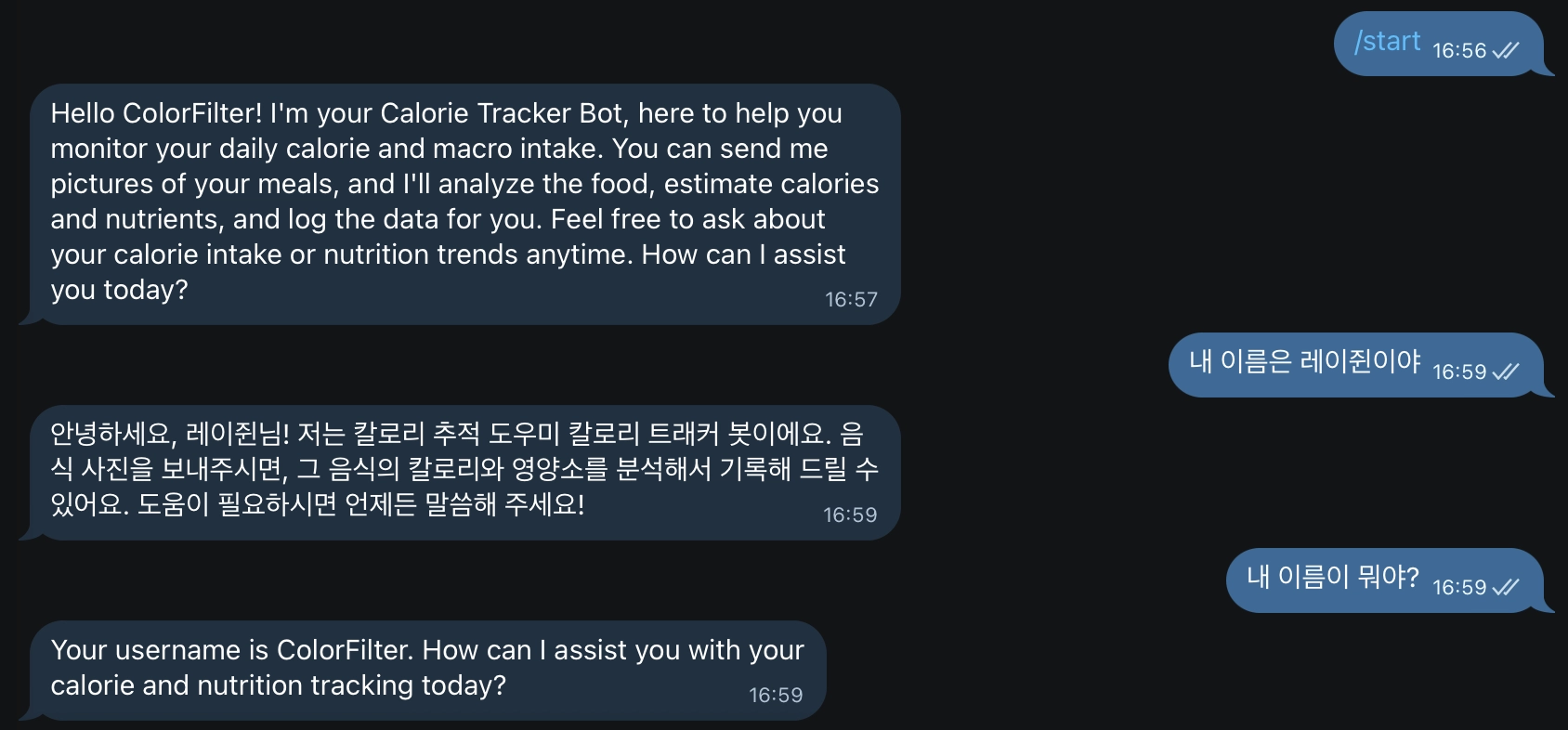
사용자와의 대화 맥락을 유지하려면 별도의 메모리 설정이 필요하다. n8n에선 인스턴스 로컬 메모리에 저장되는 Simple Memory와 MongoDB/Redis/Postgres 같은 외부 저장소 기반 메모리를 사용할 수 있다.
간단한 연습용이라면 Simple Memory로도 충분하지만 로컬 메모리에 저장되기 때문에 서버를 재시작하면 모든 내용이 초기화되고, 여러 개의 워커(Worker) 노드끼리 메모리를 공유하지 못하는 단점이 있다. 실제 운영 환경에선 Redis 같은 데이터베이스 연동을 권장한다.
AI Agent 노드 하단의 Memory 영역에서 [+] 버튼을 클릭한 뒤 Simple Memory를 추가하고 다음과 같이 설정한다.
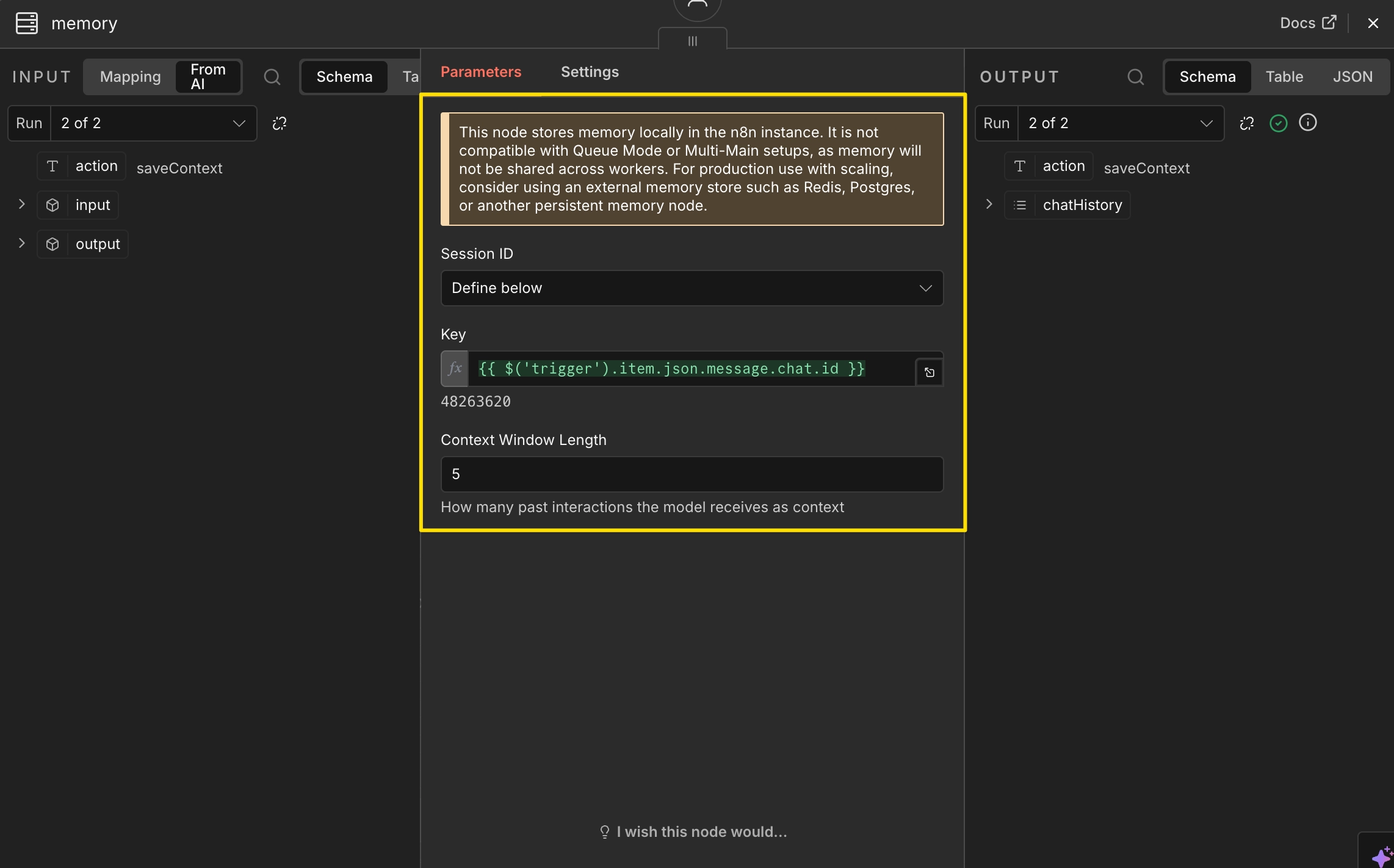
- Session ID: Define below
- Key (메모리 식별자):
{{ $('trigger').item.json.message.chat.id }}
메모리를 구분하는 고유값. 텔레그램 Chat ID를 넣어두면 사용자별로 다른 메모리 공간을 사용할 수 있다. - Context Window Length (참고할 대화 기록 수):
5
AI에게 전달할 이전 대화 개수. 5로 설정하면 최근 5개의 대화 기록을 참고하여 답변을 생성한다.
워크플로우 완성 화면
모든 노드 설정과 메모리 연결까지 완료했다면 아래와 같은 AI 기반 칼로리 트래커 워크플로우가 완성된다.
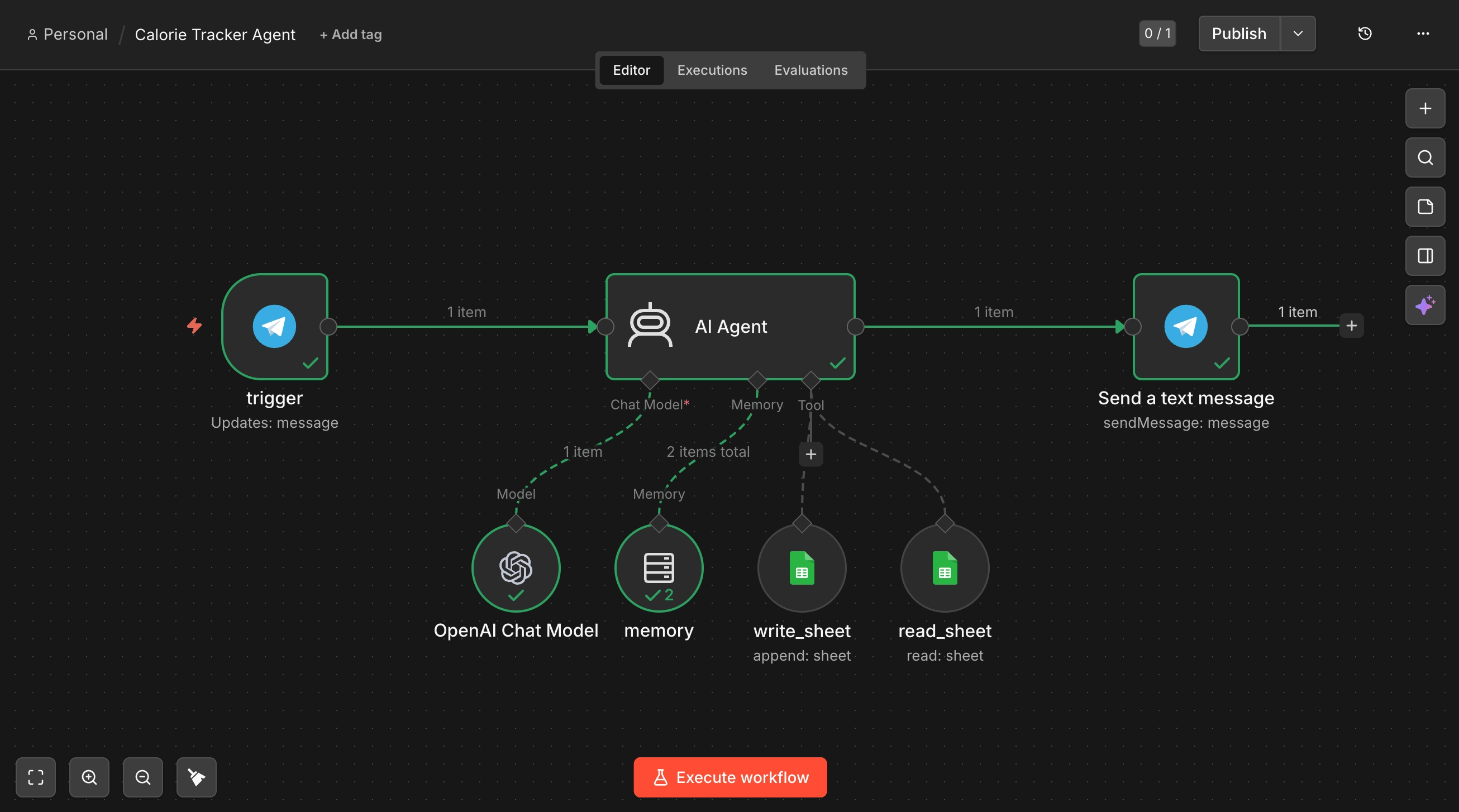
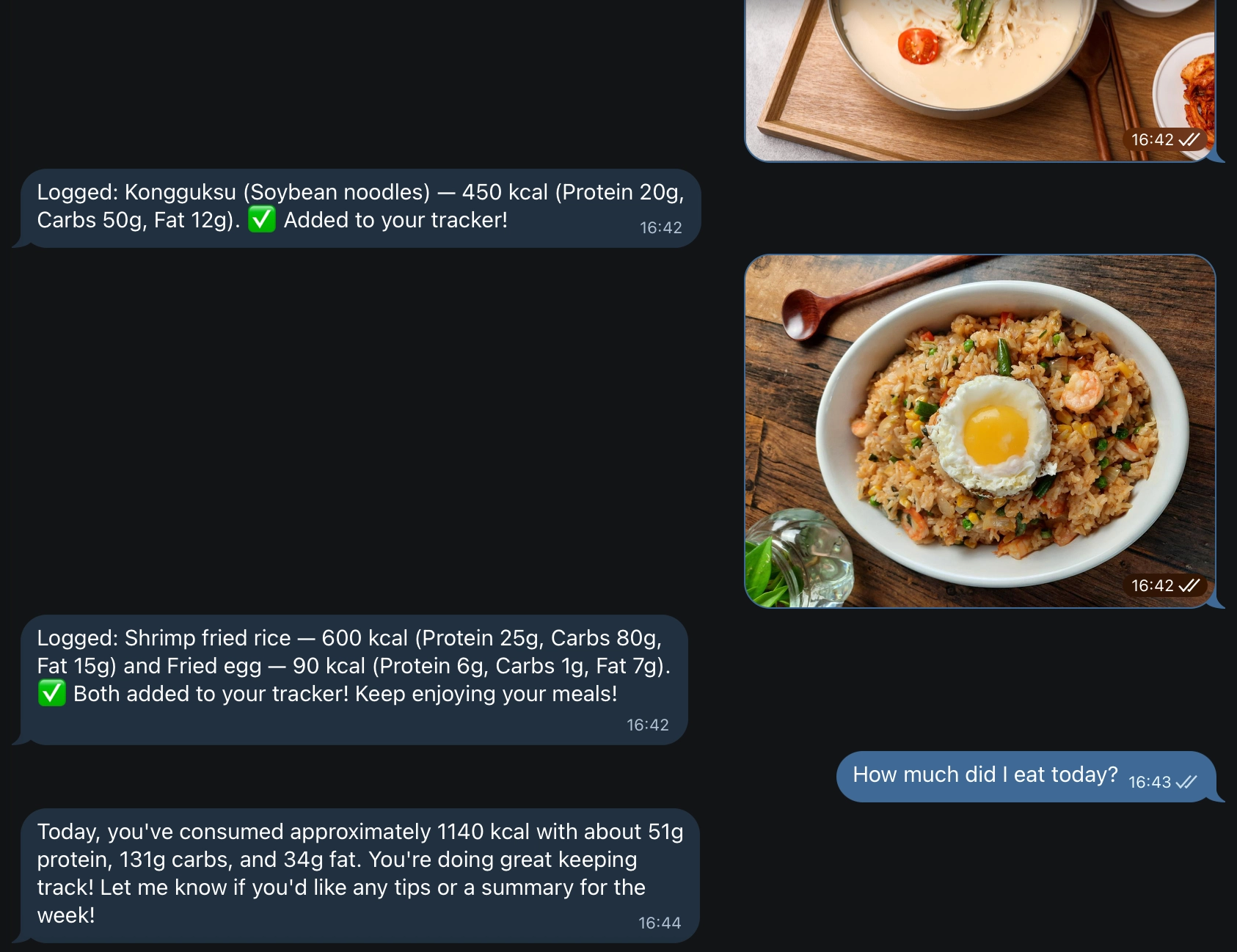
이제 텔레그램 봇으로 음식 사진을 보내면 AI Agent가 비전(Vision) 기능으로 음식을 분석하고, write_sheet 도구를 통해 구글 시트에 영양 성분을 기록한다. 반대로 "오늘 총 몇 칼로리 먹었어?"처럼 질문하면 read_sheet 도구로 시트 데이터를 조회하고 기록된 데이터를 바탕으로 섭취량을 요약해준다.
'🪄 Programming' 카테고리의 다른 글
| [n8n] AI 기반 고객센터 자동화 워크플로우 만들기 (feat. 감정 분석) (0) | 2026.06.23 |
|---|---|
| [n8n] AI 이메일 자동 답변 워크플로우 만들기 (0) | 2026.05.21 |
| [n8n] AI 에이전트로 영수증 지출 내역(가계부) 자동 기록하기 (0) | 2026.05.20 |
| [n8n] 구글 드라이브 파일/폴더 정리 AI 에이전트 만들기 (0) | 2026.05.19 |
| [n8n] 유튜브 구독 채널 새 영상 이메일로 받아보기 (0) | 2026.05.18 |